
The app sets the weight for your next set
When you log a set, the app reads how that set went, the rest you took, and how you feel, then recalculates the weight and reps for your next set. It changes during your workout, not after it ends.
- Estimated 1RM (e1RM) An estimate of the most weight you could lift once
- RIR (reps in reserve) How many more reps you could have done when you stopped
- Deload A planned recovery week, one light week after several weeks of training
- Set-by-set target vs. actual
Logging is free · Coaching that recalculates every set is Pro (14-day free trial for first-time subscribers)
GYMKC is on the App Store for iPhone and iPad.
During your workout
Log a set and your next set changes
Your next set is recalculated the moment you log a set, not after the workout ends.
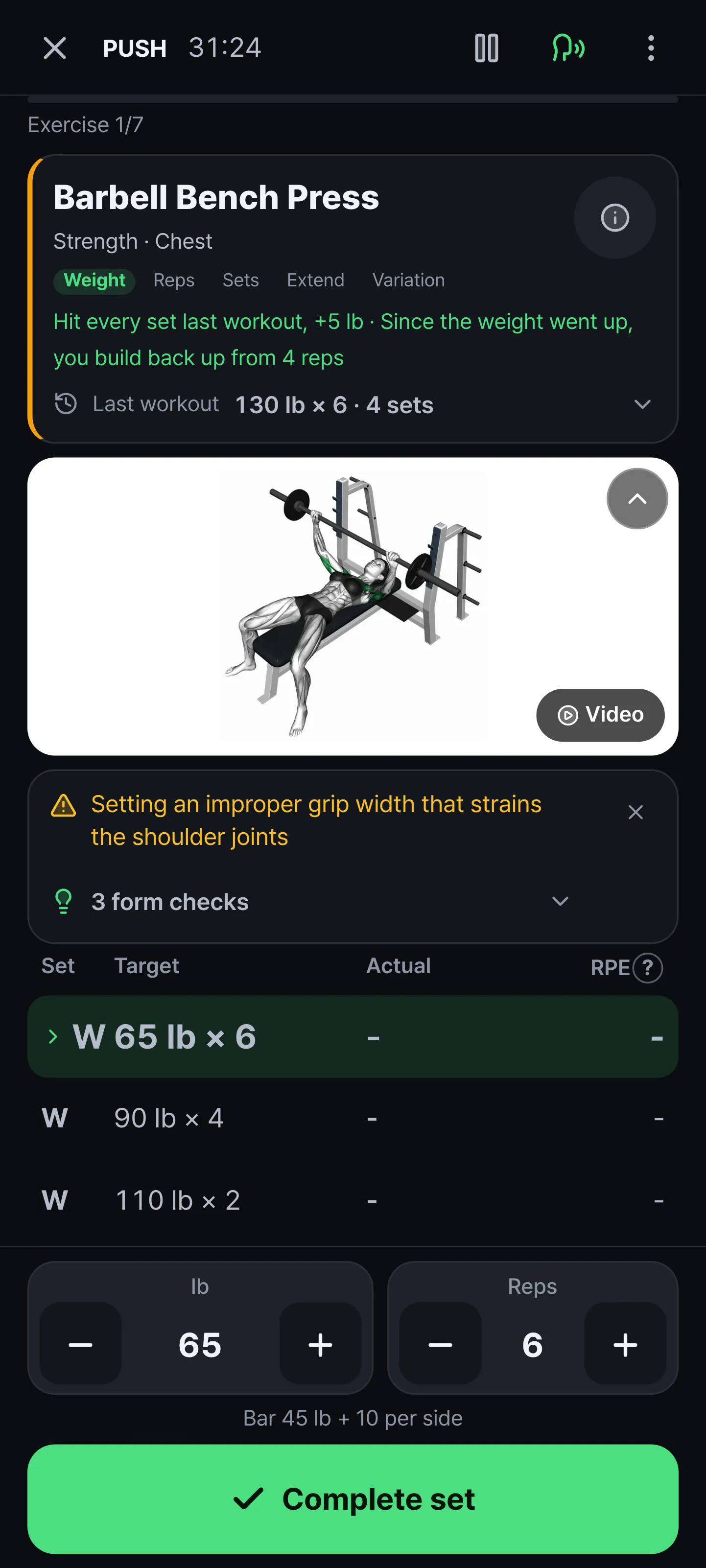
You see why it's that weight
If you have reps left, the weight goes up. If it was a grind, it comes down.
Rest time also gets longer or shorter depending on how hard your last set was.
Your target and what you actually did sit side by side on one line, so you can see set by set whether you did what you planned.
Voice coaching talks you through it, and a rest alert goes off even when your screen is off.
You can also see where your next progress will come from.
The workout card shows whether it's time to add weight, or to add reps or sets.
Your weights and sets are set by the calculation engine inside the app.
It calculates straight from your logs, so it works the same even in a basement gym with no signal.
The same logs always give the same prescription, and it never makes up a weight you don't have.
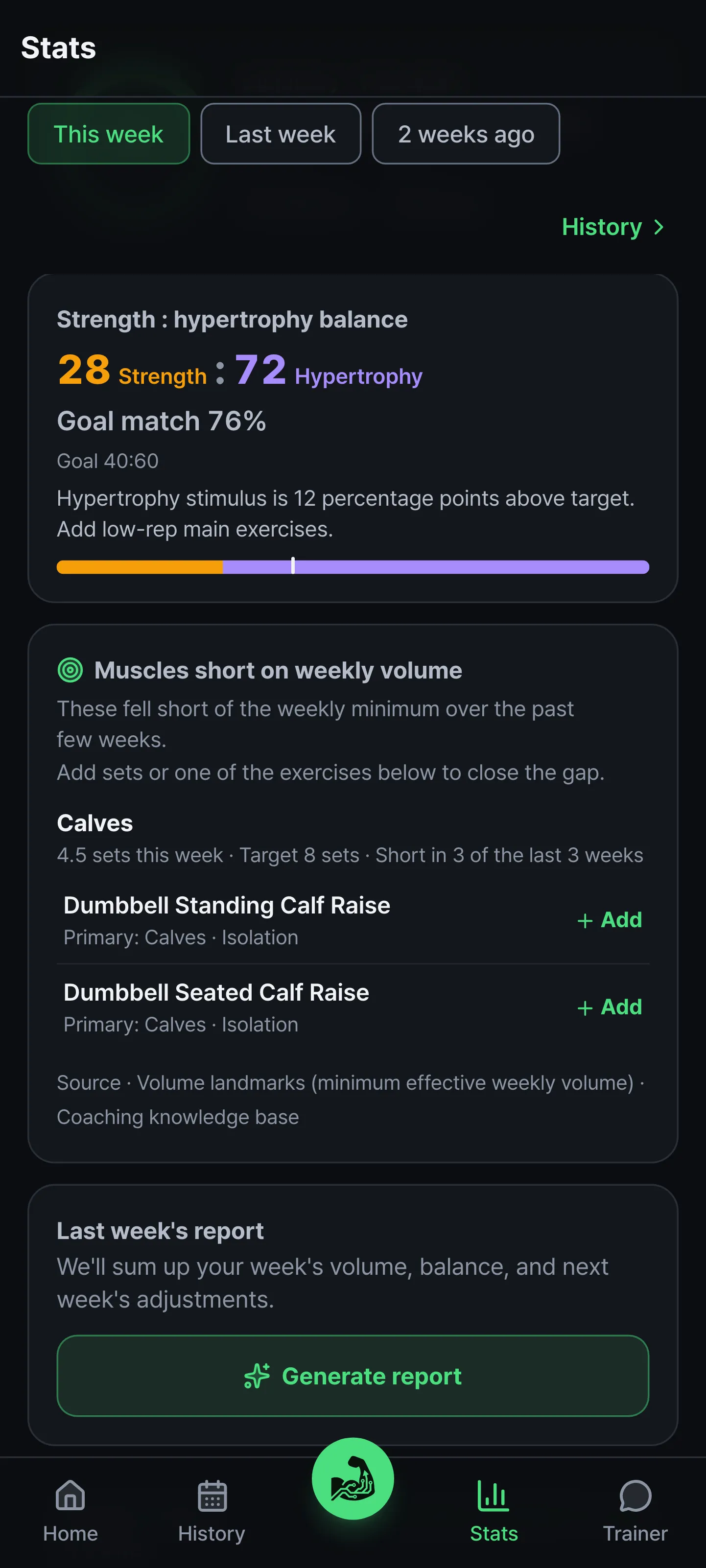
See whether you're building strength or size
Set your goal balance between strength and hypertrophy, and the app checks every week whether you're keeping it.
If you drift off, it points out what to add.
When a muscle group's weekly volume falls short of the recommended minimum, it suggests efficient exercises for that area.
Exercises that stop improving are marked as a plateau.
It doesn't analyze once and stop.
Analysis builds up with every workout and every week, and what builds up goes into your next prescription.
See which muscles you're working
The library of 7,630 exercises comes with 3D form demos and muscle maps.
You don't need another app to check your form.
See a machine you don't recognize at the gym? Take a photo and the app tells you what it is and how to use it, and you can add it straight to the workout you're doing.
No equipment at home? You can still build a workout with bodyweight exercises.
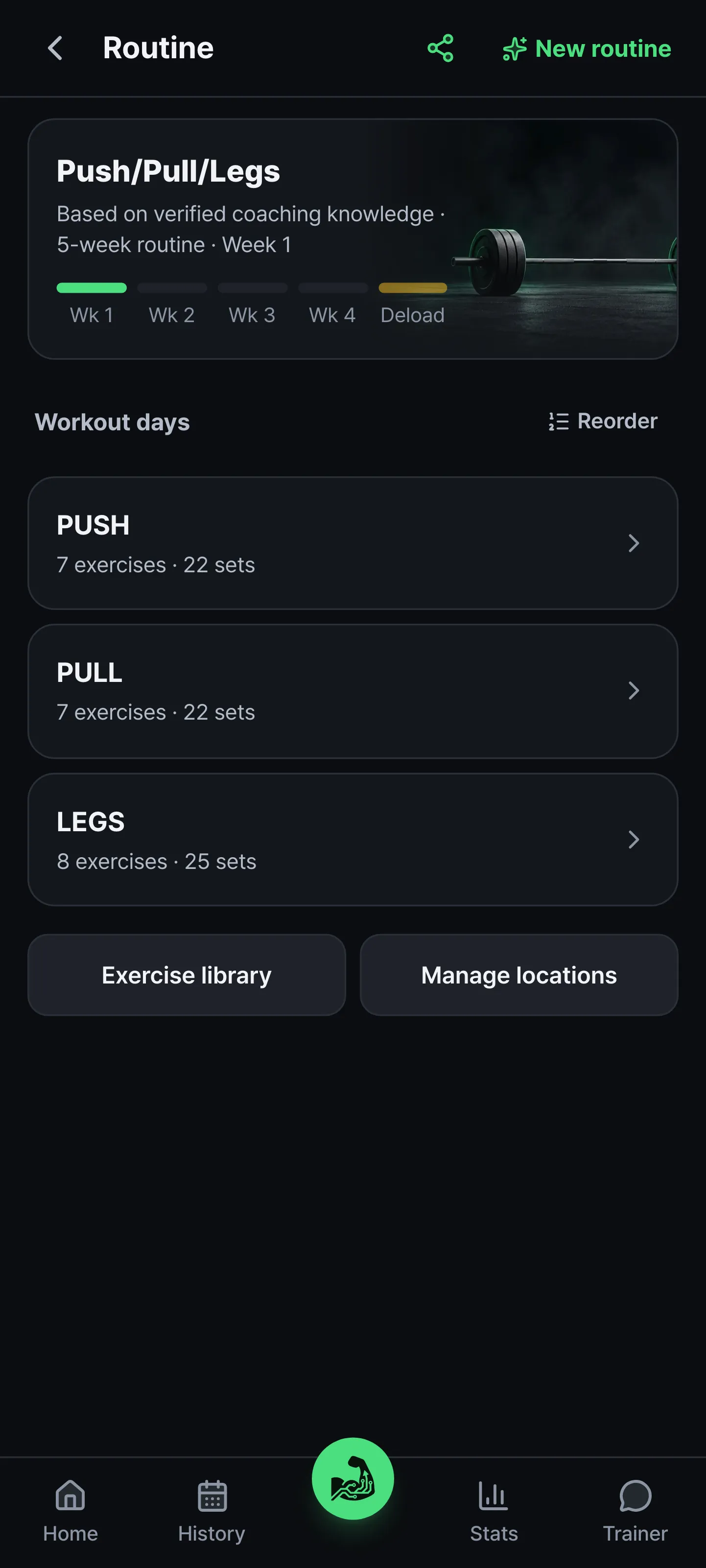
Builds week by week, and knows when to back off
Workout days and sets are planned to fit your goal.
So you don't just keep pushing, deload weeks are built in.
If you're new, one is suggested only when fatigue signals are high.
Already have a routine? On Pro, take a photo and bring it over as is.
A screenshot from another app, a spreadsheet, or a handwritten page all work.
Register the equipment you have, and the app only builds routines you can do with it.
Save your gym and your home separately to train differently in each location.
If you have both barbells and dumbbells, it picks the one you prefer first.
Short on time? Tap "Short" to start a version with just the essentials.
Set a workout length target, and days that would run long get trimmed for you.
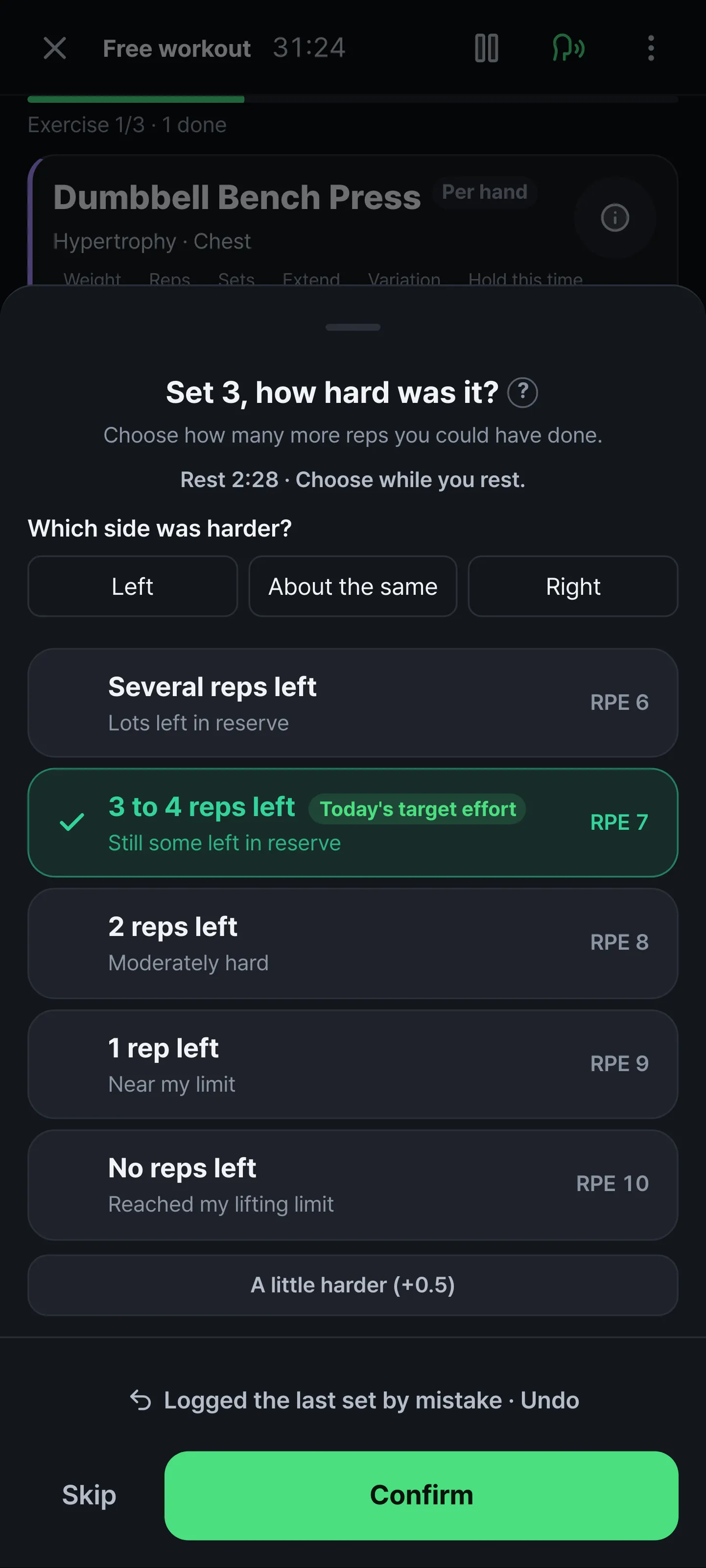
It checks your left-right balance too
If you're right-handed, your right arm often grows first.
Logs that give both sides the same target can't show that difference.
So for exercises that work each side on its own, the app asks after your last set which side was harder.
As signals build up, it adds a check set that measures each side separately.
Exercises where each hand holds its own weight, like dumbbells, are covered too.
The app adds one check set where you take both arms to failure together with the same weight, then asks which side gave out first and how many more reps the other side could have done. That set stays in your log but doesn't count toward setting your weight, because a set taken to failure can't be compared fairly with your planned sets.
When the difference holds, the app lets you know.
It doesn't lower your weight for you. Trying to fix a difference that's within the normal range only holds back your stronger side. You can see how your balance changes over time in Stats.
You just finished your last set. Try it yourself.
Evidence
Every piece of advice has a source
This is the knowledge the trainer draws on when it explains "why."
We analyze public content from evidence-based training experts in Korea and abroad,
review the evidence behind each claim, remove claims that have been debunked, and mark the ones that are contested.
That way, advice without evidence doesn't get passed along as is.
The numbers used in prescriptions are held to the same standard. For values like when to add a set or how much to cut back after a break,
we look for evidence in peer-reviewed papers and in this knowledge and record it for each item.
When the evidence is weak, we record it as weak, and when a paper disagrees with our call, we record that too and review it again.
This knowledge doesn't replace prescriptions.
The app's calculation engine sets your weights and sets from your logs, and the trainer uses the knowledge base to explain "why."
GYMKC has no affiliation, sponsorship, or endorsement relationship with any creator or brand mentioned.
"Verified" and "Contested" ratings indicate plausibility and do not replace medical advice.
How it works
How GYMKC coaches you
- You don't have to train aloneCreate a crew with an invite code to share coach reviews, weekly challenges, and routines.
- No adsOur revenue comes only from subscriptions.
You can export your workout logs to a file anytime.
Questions
Common questions before you start
Can beginners use it?
Yes. If you're new, your target leaves 2 reps in reserve instead of taking you to failure, and when the weight is adjusted during a workout, it never changes more than 5% at a time. Your first weights are set conservatively based on your sex and age, and once you've logged some workouts, your own logs set the next weight.
Can I use it with just my phone, without a smartwatch?
Yes. Logging, the rest timer, and next-set calculations all work with just your phone. Voice coaching plays from your phone too. Watch coaching and outdoor GPS tracking are Pro plan features. Without a watch, your phone tracks GPS.
Will I get a custom routine if I work out at home with dumbbells or just my bodyweight?
Yes. Choose the equipment you have, and your routine is built only from exercises you can do with it. For dumbbells, the next step comes from your list of dumbbell weights. For bodyweight exercises, reps go up first, and once you reach the top of the range, the app suggests adding weight.
Is it really free? Do I need to enter payment info?
You don't need payment info to sign up and log workouts. Everything you do yourself is free, and real-time coaching, where the trainer does the work for you, is the Pro plan. Pro is an App Store subscription, and Apple accounts subscribing for the first time get a 14-day free trial. When the trial ends, it renews automatically at the regular price. If you cancel in your App Store account settings at least 24 hours before the trial ends, you won't be charged, and everything you logged on Free stays.
Who sets the weight? Is it AI?
The calculation engine inside the app sets it from your logs, and it works the same without an internet connection. AI explains why it's that weight and helps you build routines. We've written up how the calculation works. See how it works
Pricing
Everything you do yourself is free
What your trainer does for you is the Pro plan.
Logging and following routines stay free, and your workouts are never blocked.
$0
No time limit- Log and edit workouts, with no time limit on storage
- Create routines and edit targets: set weight, reps, and sets yourself
- Deload weeks planned in your routine · a lighter recovery week
- Library of 7,630 exercises · 3D form demos
- Rest timer · Workout reminders
- Crews · Feed · Workout cards · Apple Health sync
- A taste of AI features (limited uses)
$59.99
per year · That's $4.99/month- Next weight and reps recalculated after every set, with the reason
- Rest that reads how hard your last set was and adjusts itself
- Suggests a drop set when you have reps left, and a variation when you plateau
- Left-right balance check-ins · Check sets · Trends
- This week's results become next week's targets, with weight increases and recovery weeks matched to your check-ins
- Today's workout adjusted to your condition, pain, and time
- Watch sync (Apple Watch, app only)
- Outdoor GPS tracking (running · walking · cycling)
- AI trainer chat 10 times a day · Analysis and briefing for every workout · AI routines 10 times a month · Equipment scans 15 times a month · Weekly report
- AI limits are set so normal use almost never reaches them. If you reach one, analysis and chat keep working in simple mode, and the rest refill the next day, week, or month · Logging and crews have no limits (Terms of Service, Article 8)
Pro starts with a 14-day free trial for Apple accounts subscribing for the first time.
When the trial ends, it renews automatically at the regular price for the cycle you chose.
If you cancel in your App Store account settings at least 24 hours before the trial ends, you won't be charged.
Payments and cancellation are managed in the App Store.
Everything you logged on Free stays, and personalized prescriptions start with your very next set the moment you switch.
Prices shown are for the US App Store. In Canada, Australia, New Zealand, and Singapore, the App Store shows the price in your local currency.
Coaching starts the moment you log today's workout
Install the app and sign in, and your first routine is built for you.
Download the app